
There's no correct number of Shopify apps — only the point where the next one costs more than it earns. A practical audit for finding overlap, waste and page weight.
How Many Shopify Apps Should You Have? A One-Hour Stack Audit
There is no correct number of Shopify apps. There is only the number where the next app you install costs you more than it earns — in money, in page weight, and in the time you spend keeping it all working.
Most merchants blow past that line without noticing, because apps are added one at a time in response to a specific problem and are almost never removed. The subscription is small. The problem was real. Nobody schedules an app review.
This is a practical audit you can run in about an hour, and the reasoning behind each step.
Why "how many apps" is the wrong question
An app's cost to your store is not a function of how many others are installed. It is a function of what that specific app does:
- A backend-only app — accounting sync, invoicing, inventory to your warehouse, order export — adds nothing to your storefront. You could run twenty and your customers would never load a byte of it.
- A theme app extension — the modern way Shopify apps inject storefront functionality — is scoped, loads only where it is used, and is comparatively cheap.
- A legacy script-tag app injects JavaScript on every page whether the feature appears there or not. One of these can cost you more than ten of the first kind.
So a store running 25 apps of which 18 are backend can easily be faster than a store running 8 that all inject scripts. Counting apps tells you nothing. Counting storefront apps tells you a great deal.
The number that matters is not how many apps you have. It is how many of them touch the page a customer loads.
The audit, step by step
Step 1: list what you are actually paying for
Shopify admin → Settings → Billing shows every active app subscription with its monthly charge. Export it or write it down. Two things routinely turn up here:
- Apps you uninstalled from the Apps page but never cancelled the subscription for.
- Apps on a plan tier you outgrew in the wrong direction — paying for 10,000 emails a month while sending 900.
Add the column up. Whatever the total is, it is almost certainly higher than your mental estimate, because app spend accumulates in $9.99 increments.
Step 2: sort by cost per outcome, not by cost
For each app, write one sentence: what would break if this were gone tomorrow? Then sort into three buckets:
- Load-bearing. Revenue stops or operations break. Reviews, subscriptions, your shipping integration, your email platform.
- Measurably useful. You can point at a number it moved. An upsell app with attributed revenue. A search app with a conversion lift you actually measured.
- Neither. You cannot remember why it is installed, or you installed it for a campaign that ended.
The third bucket is usually a third of the list, and it is pure margin. Cancel it.
Step 3: find the overlaps
This is where the real savings are, and it is the step everyone skips. Apps in adjacent categories have been growing into each other's territory for years. Very commonly duplicated in the same stack:
| You probably have | Which may already do |
|---|---|
| An email marketing platform | Pop-ups, SMS, abandoned cart, basic segmentation |
| A product reviews app | Photo/video UGC, review request emails, star widgets, Q&A |
| An upsell / cross-sell app | Bundles, volume discounts, post-purchase offers, free-gift rules |
| A page builder | Countdown timers, banners, badges, FAQ sections, sliders |
| A loyalty app | Referrals, VIP tiers, points-based discounts |
| Your theme | Mega menus, quick view, sticky cart, size charts, wishlists |
Before you renew anything, open the pricing page of the app you consider load-bearing in that group and read the feature list on the tier above yours. Consolidating two $29 apps into one $49 tier is usually cheaper, always fewer scripts, and one less vendor to chase when something breaks.
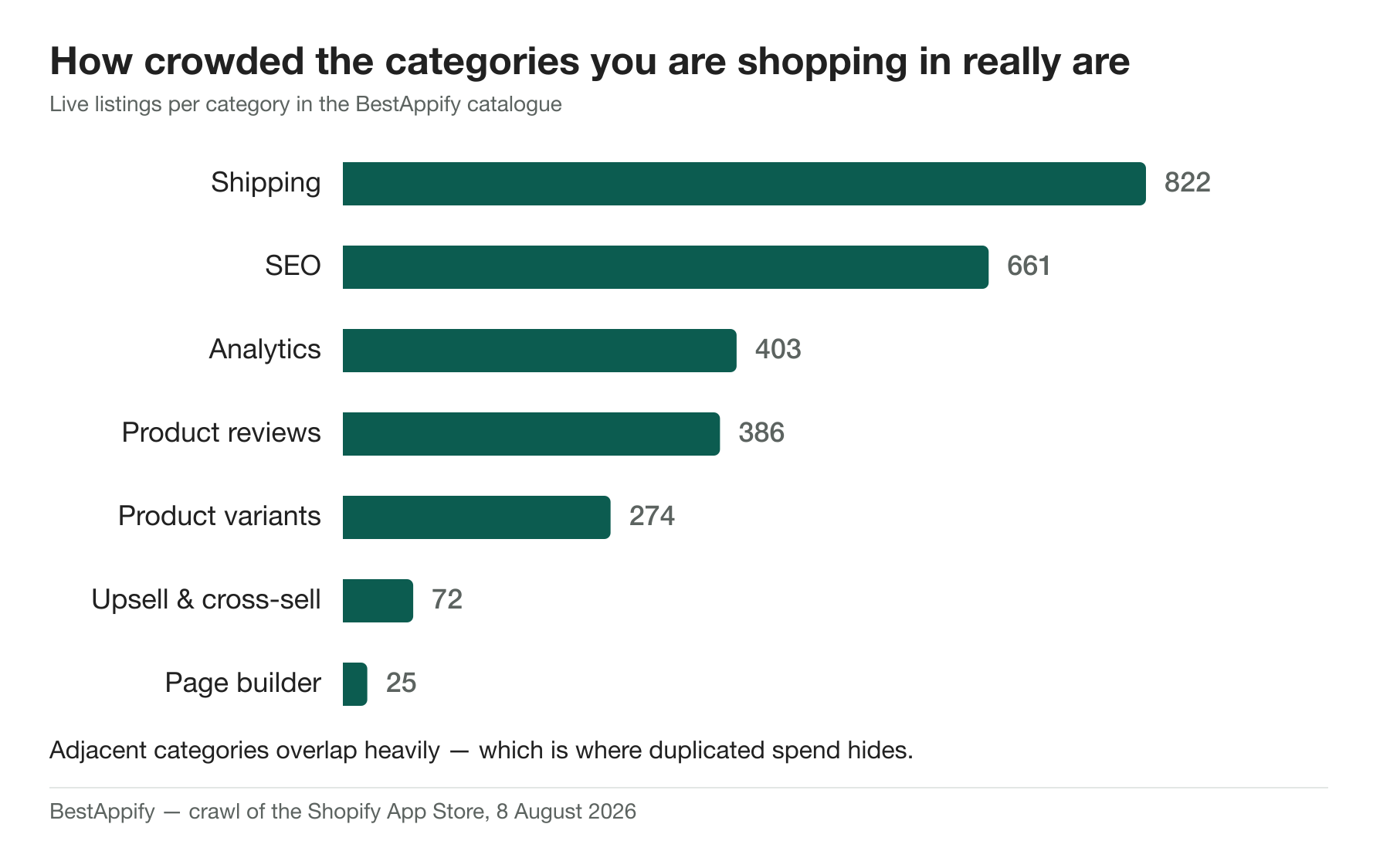
Our catalogue reflects how crowded these adjacencies are: 822 shipping apps, 661 SEO apps, 403 analytics apps and 386 product review apps, all overlapping heavily in what they promise.
Step 4: measure the storefront cost
Run your homepage, a collection page and a product page through PageSpeed Insights. Then, in Chrome DevTools, open the Network tab, reload, sort by size, and look at the third-party JavaScript. App scripts are usually identifiable by domain.
You are looking for two things:
- A single app contributing an outsized share of your JavaScript.
- An app loading on pages where its feature does not appear — a product-page widget loading on your blog, a cart script on your homepage. That is the script-tag pattern and it is pure waste.
If you want to be rigorous: uninstall a suspect app on a duplicate theme, re-run the test, and compare. Guessing which app is heavy is unreliable; measuring takes ten minutes.
Step 5: check the apps themselves are still healthy
An app that was excellent three years ago can be abandoned now. Two signals, both free to check on the app's App Store listing:
- The last twenty reviews. Sorted by newest, not by helpful. Support response time is what merchants complain about first when a company is in trouble.
- The changelog and last update date. An app that has not shipped anything in a year, in an ecosystem where Shopify changes checkout and theme APIs regularly, is a liability.
Be careful reading the rating alone: 48.6% of rated Shopify apps carry a perfect 5.0, and the median app with that score has just four reviews. Volume is the signal, not stars.
So what is a normal number?
With all of that said, some rough calibration, because people do want a number:
| Stage | Typical storefront-facing apps | What is usually there |
|---|---|---|
| Launching | 2–4 | Reviews, email, one conversion tool |
| Growing | 5–8 | The above plus upsell, loyalty or subscriptions, search |
| Established | 8–12 | Add internationalisation, advanced merchandising, helpdesk |
Backend apps sit outside this count entirely. If your storefront-facing number is well above the band for your stage, that is a prompt to look for overlap — not proof that anything is wrong.
Make it a habit, not an event
The reason stacks bloat is that installing is a decision with an owner and removing is nobody's job. Put a recurring 30-minute review in the calendar each quarter with three questions:
- What did we install since last time, and did it do what we installed it for?
- What is in the billing list that nobody has opened in 90 days?
- Did any app we keep release something that makes another app redundant?
Four of those a year will keep a stack honest permanently.
Shortcut
If you would rather not do step one by hand, our free store audit reads your storefront, identifies the apps you are running, flags overlapping functionality and shows what comparable stores in your niche use. It takes about a minute and does not need admin access.
You can also browse the app catalogue by category to see what a consolidated alternative would cost, or check the leaderboard for the highest-rated app in any category weighted by review volume rather than stars alone.