
Free plan, free trial and free to install are three different things. We checked 500 listings plus the 100 most-reviewed apps to see which is which.
Free Shopify Apps: Which Ones Are Actually Free
"Free" means three different things on the Shopify App Store, and only one of them means you never pay.
- Free plan — a permanent $0 tier with real functionality. This is the one you want.
- Free trial — full features for 7 to 14 days, then a bill. Not free.
- Free to install — the app costs nothing to add, then charges per use, per order, or as a commission. Sometimes the cheapest option you will find; sometimes the most expensive.
Every roundup of "free Shopify apps" mixes all three. We checked the live pricing page of 500 randomly selected listings, plus the 100 most-reviewed apps in the catalogue, and sorted them by which kind of free they actually are.
How much of the App Store is genuinely free
Of the 500 listings we could classify:
| What you get | Apps | Share |
|---|---|---|
| A permanent free plan, with paid tiers above it | 197 | 39.4% |
| Free with no paid tier at all | 57 | 11.4% |
| No paid plan published (free, or free to install) | 95 | 19.0% |
| No free option — paid from day one | 151 | 30.2% |
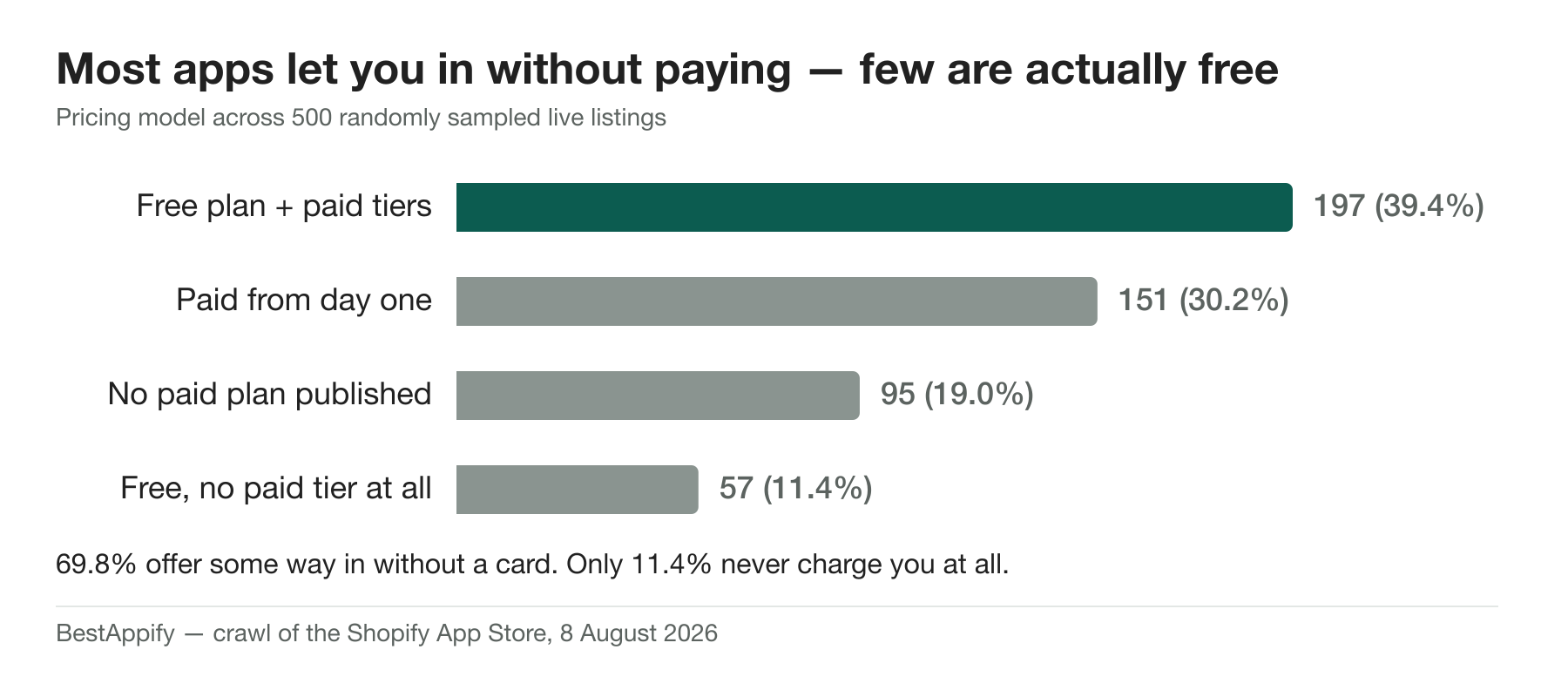
So 69.8% of apps let you in without a card, but only 11.4% are free in the sense of never charging you at all — and those are mostly small, single-purpose utilities.
The interesting group is the 39.4% running a real free tier under their paid plans. That is where the good free software is, because the free tier is funded by the paid one.
Genuinely free apps that are also good
A free plan on an app nobody uses is not much of a recommendation. These are the most-reviewed apps in our catalogue that offer a permanent free tier or are free to install — free and proven:
| App | Rating | Reviews | Paid tiers start at |
|---|---|---|---|
| Judge.me Product Reviews App | 5 | 42,832 | from $15/mo |
| TikTok | 4.8 | 15,257 | Free — no paid tier |
| Shopify Flow | 4.7 | 11,572 | Free to install |
| Loox ‑ Product Reviews App | 4.9 | 8,817 | from $49.99/mo |
| Pop Convert ‑ Pop Ups, Banners | 4.9 | 8,575 | from $15/mo |
| Shop | 4.8 | 8,146 | Free to install |
| Appstle℠ Subscriptions App | 5 | 8,048 | from $10/mo |
| SendWILL Popup Email Marketing | 4.9 | 7,470 | Free to install |
| DSers: Dropship+AliExpress+AI | 5 | 5,824 | from $19.90/mo |
| PageFly Landing Page Builder | 4.9 | 5,652 | from $24/mo |
| Shopify Inbox | 4.6 | 5,461 | Free to install |
| BOOSTER AI SEO + AEO OPTIMIZER | 4.9 | 5,237 | from $39/mo |
Review counts are the thing to weigh here, not the star rating: 48.6% of rated Shopify apps show a perfect 5.0, and the median app with that score has four reviews.
What a free plan actually costs you
Free tiers are a funnel, and they are metered on whatever grows when your store grows. In practice the cap is almost always one of these:
- Volume. Orders per month, emails sent, review requests, subscribers. The most common design: generous enough to be genuinely useful at launch, binding within a year of real growth.
- Branding. A "powered by" badge on the widget your customers see. Removing it is frequently the entire value of the first paid tier.
- Integrations. The free tier works standalone; connecting it to your email platform or analytics is paid.
- Support. Community or email-only with a slow queue. This is the one that bites during an outage.
None of that makes free plans a trap. It makes them a stage. The mistake is not using them — it is building a workflow on one, hitting the cap during your busiest week, and having to migrate under pressure.
How to tell which kind of free you are looking at
- Read the pricing block on the listing, not the badge. "Free plan available" and "Free trial available" are different badges and mean different things.
- Find the $0 column and read its limits. If the free tier has no stated limit, the limit is a feature you have not noticed yet.
- For free-to-install apps, find the per-transaction rate. A 1% commission on a store doing $50k a month is $500 a month. That is not a free app; it is an expensive one with no upfront cost.
- Check the price of the tier above. That is what you are really signing up for, because it is where you will end up if the app works.
When to pay instead
Free is the right default at low volume. It stops being right when any of these are true:
- The app touches money directly — checkout, subscriptions, payments. Support response time matters more than $29.
- You are near the cap already. Migrating later costs more than the plan does.
- The branding is on a customer-facing widget and your brand is a differentiator.
- You would be running two free apps to replace one paid one. Two apps is two scripts, two vendors and two failure modes.
Methodology
Live App Store listings fetched on 8 August 2026: a random sample of 500 of the 6,732 live apps in the BestAppify catalogue, plus the 100 apps with the highest review counts. Each listing's published pricing plans were parsed from the page; a listing counts as having a free plan when it publishes a $0 recurring tier, and as publishing no paid plan when it publishes no priced plan at all.
The "no paid plan" group is grouped with free options because nothing on the listing asks for money up front — not because it is costless. Usage and commission billing does not appear on the listing and can exceed any subscription, so treat that row as "no published price", not as "free".
The short version
- 69.8% of listings offer a free plan or free installation; only 11.4% have no paid tier at all.
- A free trial is not a free plan. Check which badge the listing carries.
- The best free software sits on the free tier of a funded paid app, not on a free-only app.
- Read the cap before you build a workflow on it.
Browse the full app catalogue to compare free tiers side by side, or run a free store audit to see which of the apps you already pay for have a free tier that would cover your volume. Related: what Shopify apps actually cost.